If you've spent any time looking for video editing software, a PDF editor, or a data recovery tool, Wondershare has almost certainly appeared in your search results. They're one of the most prolific software brands in the world — with products spanning video creation, document management, mobile utilities, data recovery, and diagramming — all under a single company umbrella.
But a big catalog doesn't automatically mean every product is worth buying. And with over 10,000 reviews on Trustpilot alone (ranging from effusive praise to serious billing complaints), the picture is complicated enough to warrant a thorough, honest breakdown.
This review covers Wondershare's full product suite, real customer experiences, pricing realities, the known complaints around billing and refunds, and a clear verdict on which products genuinely deliver value — and which ones require extra caution before purchasing.
What Is Wondershare?
Wondershare Technology Group Co., Ltd. was founded in 2003 and has evolved from a desktop-software maker into a global leader in AI-powered creative tools — launching Filmora in 2010, PDFelement in 2015, and EdrawMax in 2018, and integrating AI across its suite from 2020 onward. The company is publicly traded on the Shenzhen Stock Exchange (300624.SZ) and as of late 2026 claims a cumulative active user base exceeding 2 billion, serving users in over 200 countries and regions.
The company's stated mission is to "Simplify Creativity" — a phrase that captures the core positioning of nearly every product they build. Rather than targeting enterprise professionals or specialist power users, Wondershare consistently goes after the mainstream: the YouTuber who wants to edit without a film school degree, the small business owner who needs to manage PDFs without paying Adobe's prices, the person who accidentally deleted their hard drive and needs their files back.
Wondershare invests heavily in R&D — approximately 54% of the workforce are R&D staff, with 442 million yuan in R&D expenditure in 2024. That investment shows up in a consistent cadence of product updates and genuinely competitive AI feature integration across their tools.
🚀 Explore Wondershare's full software suite — video editing, PDF tools, data recovery, and more at wondershare.com →
Wondershare's Product Suite: A Full Overview
Wondershare is not a one-product company. Understanding what they make — and where each product sits in the market — is essential context for evaluating whether any single tool is worth your investment.
1. Filmora — Video Editing for Creators
Filmora is Wondershare's flagship product and their most reviewed, most discussed, and most widely used tool. It is a video editing software designed to enable users to create, modify, and enhance video content through cutting, trimming, merging, effects, filters, transitions, audio editing, and text overlays — with a user interface intended to simplify the editing process for individuals and businesses producing visual media for presentations, social media, and professional applications.
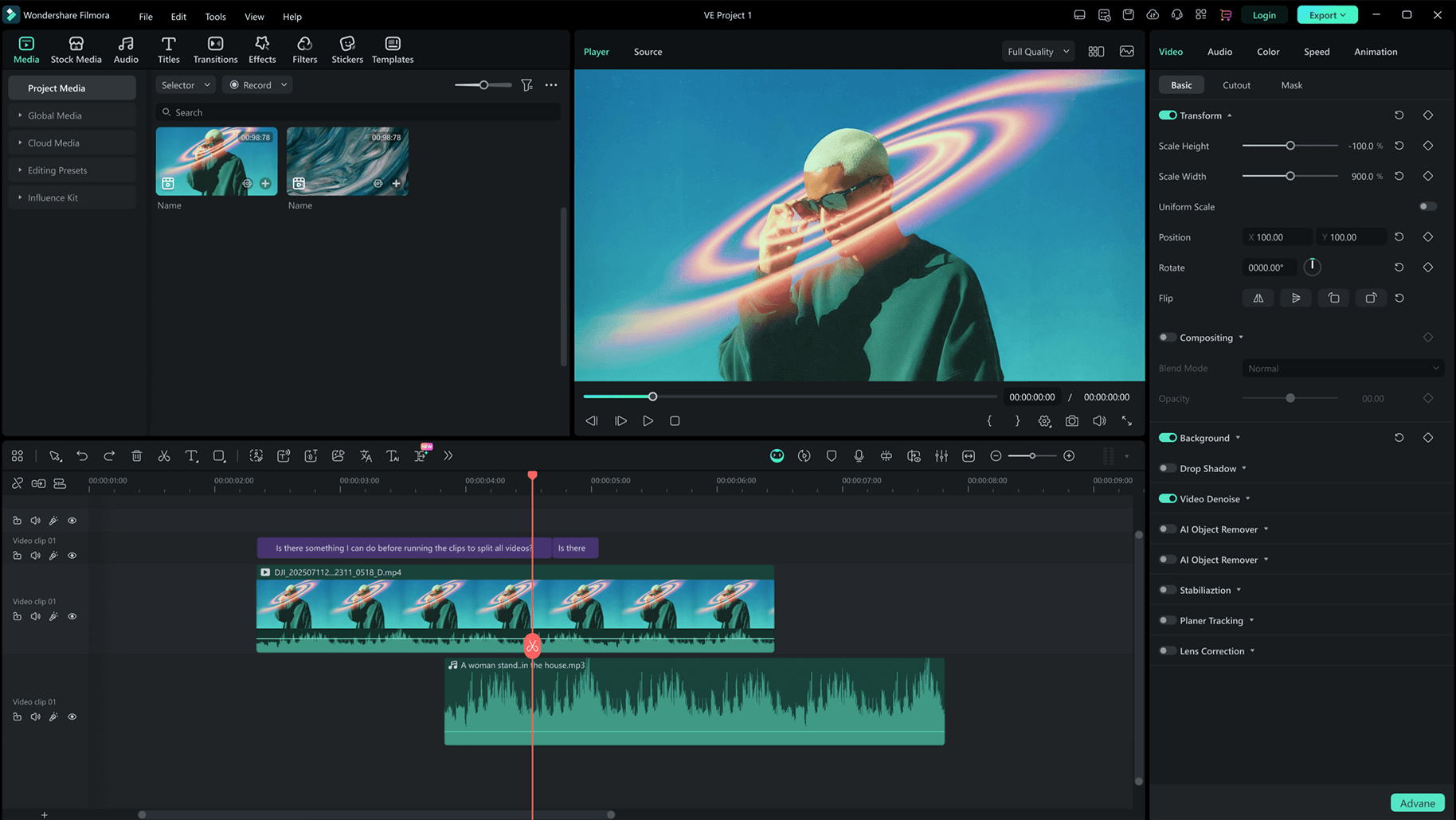
Who it's built for: The sweet spot for Filmora is content creators, YouTubers, educators, and small business marketing teams who want results that look professional without investing years into learning Premiere Pro or Final Cut Pro. It simplifies advanced features, making them accessible even for beginners — tasks like background removal or auto-enhancing footage are made quick and efficient through AI.
AI features in Filmora 15 (2026): The latest major version introduced a significant expansion of AI-powered tools, including AI Video Extender, AI Image Generator, Text-to-Video, AI Music Generator, AI background removal, smart captions, and motion path tools. These tools use server-side GPU processing, which Wondershare covers through an AI Credit system — subscription users receive a monthly refresh of credits, while perpetual license holders receive a one-time credit allocation at purchase.
Pricing (current as of 2026):
| Plan | Price | What's Included |
|---|---|---|
| Free (Trial) | $0 | All features, watermark on exports |
| Annual Plan | $49.99–$69.99/year | No watermark, monthly AI credit refresh, all updates |
| Perpetual License | $79.99–$109.99 (one-time) | Lifetime access to current version, one-time AI credits |
| Cross-Platform Annual | $69.99/year | Subscription covering Windows, Mac, and mobile |
A critical distinction buyers often miss: the Perpetual License locks you into 2026 technology without automatic access to future major versions. If Filmora 16 launches with a significant AI update, perpetual license holders must pay an upgrade fee — typically 30–50% of the full perpetual price — to access it. Subscription plans include all updates and upgrades automatically.
What real users say: Users frequently summarise Filmora as "easy to learn and perfect for YouTube editing." Across G2 and Gartner Peer Insights, the consistent praise centres on the balance between beginner accessibility and professional output — easy to navigate with professionally-looking effects, colour management, and transitions, with UX adjustable to individual preferences.
The constructive criticism focuses on two areas: cloud collaboration is cumbersome for multi-device workflows, and users migrating from other editing software face a transitional learning curve because the Filmora interface doesn't follow industry-standard conventions.
Filmora vs. competitors: Filmora's closest comparisons are DaVinci Resolve (free but steep learning curve), CapCut Pro (simpler, mobile-first), and Adobe Premiere Elements (similar price tier, less AI). For the target user — someone who wants polished social media or YouTube content without professional training — Filmora is among the best-positioned options in its price range.
🎬 Start editing videos like a pro — try Filmora free at wondershare.com →
2. PDFelement — Adobe Acrobat's Most Credible Rival
PDFelement is Wondershare's second most prominent product and arguably their strongest value proposition product in the entire portfolio. Adobe Acrobat's yearly plan is $239, while Nitro offers its Pro plan for €199.78 — PDFelement is significantly more affordable than both.

The latest version, PDFelement V12, was released in September 2026 and introduced multi-model AI support — letting users switch between ChatGPT, DeepSeek, and Gemini within a single session — alongside Smart Redaction for automatically detecting and removing sensitive data, professional-grade translation across 75 languages, and expanded batch processing tools.
Core capabilities:
PDFelement handles the full PDF workflow: create PDFs from scratch or from Word/Excel/PowerPoint, edit text and images directly in existing PDFs as naturally as editing a Word document, convert PDFs to other formats with layout preservation, annotate and comment, fill and create forms, apply digital signatures, apply OCR to scanned documents, and batch-process multiple files simultaneously.
PDFelement delivers approximately 90–95% of Adobe Acrobat Pro's everyday functionality at roughly one-third the price. For the vast majority of professionals who need reliable PDF editing, form creation, document signing, and file conversion, PDFelement handles these tasks with a Word-like editing experience that requires virtually no learning curve.
Pricing (PDFelement, 2026):
| Plan | Price |
|---|---|
| Annual Plan | ~$79.99/year |
| 2-Year Plan | ~$109.99 |
| Perpetual License | ~$129.99 (one-time) |
What real users say: A consistent theme among PDFelement buyers is appreciation for the one-time perpetual license option — a genuine differentiator against Adobe Acrobat's subscription-only model. Frequent updates and improvements are specifically praised. One verified buyer summarised it directly: "This program works just as good as Adobe Acrobat professional and it is much cheaper to buy a license where one does not have to pay a monthly fee."
The notable complaints focus on two friction points: a mandatory Wondershare account login each session (which many buyers find unnecessarily intrusive), and post-purchase upsell pop-ups encouraging upgrades — particularly frustrating for buyers who specifically chose the perpetual license to avoid recurring costs.
G2 reviewers note that Wondershare PDFelement offers excellent customer support, with many users praising the responsiveness and helpfulness of the support team. This is meaningfully better feedback than the general Wondershare support reputation and reflects a more mature product with a more established support pipeline.
PDFelement vs. Adobe Acrobat: For individual professionals and small teams, PDFelement wins on price by a significant margin. Adobe retains advantages in enterprise features, collaborative document review, and the depth of its PDF standards compliance. But for everyday PDF editing, conversion, and signing workflows — PDFelement possesses a far more comprehensive user interface than Adobe, which makes it easier to learn and adapt quickly, and is relatively easier for extracting data or creating fillable PDF forms.
📄 Stop overpaying for Adobe — try PDFelement free and see the difference at wondershare.com →
3. Dr.Fone — Mobile Data Recovery, Transfer & Unlock
Dr.Fone is Wondershare's mobile utility suite, designed for iPhone and Android users who need to recover lost data, transfer content between devices, back up their phone, or unlock a device without a passcode.

Dr.Fone offers iOS and Android support for data recovery, backup, screen unlock, and transfer features. It's the go-to tool for people switching phones and wanting to migrate all data seamlessly, for anyone who has lost photos or contacts after a factory reset or crash, and for IT support professionals managing multiple devices.
Pricing: iOS version at ~$99.95/year; Android at ~$79.95/year; full version (both platforms) at ~$139.95/year.
The pricing is notably higher than the rest of the Wondershare portfolio and has drawn some complaints — particularly from users who felt the one-year subscription model was expensive for a tool most people use infrequently. The functional reviews, however, are generally positive for core data recovery and phone transfer workflows.
4. Recoverit — Data Recovery for Computers & Drives
Recoverit helps users retrieve lost, deleted, or corrupted files from various storage devices, supporting over 1,000 file formats and recovering data from hard drives, memory cards, USBs, and even crashed systems.
This is a category where the software either works — often genuinely saving irreplaceable photos, documents, or business files — or it doesn't, and the disappointment is acute. Users frequently describe Recoverit as: "Saved my lost data when nothing else worked."
Data recovery software is inherently unreliable in the sense that success rates depend heavily on how long ago the file was deleted, whether the storage has been written to since deletion, and the nature of the corruption. Recoverit performs competitively within this category and is worth trying before assuming data is unrecoverable.
Pricing: ~$69–$99/year depending on plan.
5. UniConverter — Video & Audio Conversion
UniConverter enables users to convert video and audio files to different formats, compress media, download online videos, and burn DVDs — making it ideal for content creators dealing with large media files.
It handles a wide range of format conversions including MP4, MOV, AVI, MKV, MP3, WAV, and many more, with batch processing support and video compression tools built in. For creators who regularly deal with format compatibility issues — sending footage to collaborators on different platforms, compressing files for web upload, or converting for specific device playback — UniConverter solves a real and recurring problem.
Pricing: Annual plan ~$39.99/year; perpetual ~$79.99.
6. EdrawMax — Diagramming and Visual Documentation
EdrawMax helps professionals create flowcharts, mind maps, infographics, floor plans, and more. It's positioned as a cross-platform alternative to Microsoft Visio and Lucidchart, with a strong template library and export compatibility with standard diagram formats.
EdrawMax was introduced in 2018 and is used across business, engineering, and education markets. For teams that need to document systems, processes, or infrastructure visually without paying Visio's premium pricing, EdrawMax offers strong value.
Wondershare Pricing: A Clear Summary
| Product | Annual Plan | Perpetual License |
|---|---|---|
| Filmora (video editor) | $49.99–$69.99/yr | $79.99–$109.99 |
| PDFelement (PDF editor) | $79.99/yr | $129.99 |
| UniConverter | $39.99/yr | $79.99 |
| Dr.Fone (iOS + Android) | $139.95/yr | — |
| Recoverit | $69–$99/yr | — |
| EdrawMax | Varies | Available |
30-day money-back guarantee is stated on all products. The practical reality of this guarantee — and where it sometimes fails — is covered honestly in the complaints section below.
What Real Customers Are Saying About Wondershare
Over 10,900 people have reviewed Wondershare on Trustpilot. The overall picture is genuinely split between strong product satisfaction and recurring frustrations with billing and licensing practices. Both sides of this picture deserve honest coverage.
What Satisfied Customers Consistently Praise
Product quality across the board. The most consistent thread in positive Wondershare reviews is that the software works as described. Long-term customers consistently report reliability — one buyer described purchasing from Wondershare for more than a decade, highlighting consistent honesty and reliability, and a unique selection of features hard to find elsewhere.
Filmora as a long-term editing platform. Multiple Trustpilot reviewers describe Filmora as software they will never switch away from, citing reasonable pricing, free updates, and responsive customer service. One buyer specifically credited Filmora's AI features with helping their music content reach 251,000 plays per month across TikTok, YouTube, and Instagram.
PDFelement's value proposition against Adobe. The one-time perpetual license for PDFelement draws consistent praise from professionals and small business owners who were previously paying Adobe's monthly subscription fees. The cost reduction is meaningful and the feature parity for everyday use is real.
Proactive customer service in specific cases. At least one verified Trustpilot reviewer describes receiving a proactive email from Wondershare's customer service team about a PDFelement issue before even contacting support themselves — with a two-step fix that resolved the issue immediately, described as demonstrating "a whole different perspective to the words proactive and customer service."
The Complaints You Need to Know Before Buying
Billing and subscription issues. This is the most concentrated area of negative feedback, particularly on PissedConsumer and among one-star Trustpilot reviews. Frequent Wondershare customer complaints cite poor customer service, automated AI-only support, denied refunds, duplicate charges, and subscription billing problems.
The "lifetime license" problem. A serious pattern of complaints emerges around perpetual (lifetime) licenses breaking or losing functionality after major version updates. One buyer describes purchasing a "lifetime" PDFelement license for two users that worked perfectly until the latest update — when it began crashing on every use. Wondershare's solution was to purchase the newest version. The customer's repeated requests to have the product they already paid for restored to working order were ignored. This is a systemic complaint, not an isolated incident.
Refund policy in practice. The 30-day money-back guarantee is advertised but not always honoured without friction. At least one buyer describes Wondershare not offering any solution to a billing dispute, with the bank ultimately issuing the refund rather than the company.
Auto-renewal without clear notice. Multiple buyers describe being charged for subscription renewals they did not intend to continue, with difficulty cancelling and obtaining refunds. Buyers planning to use any Wondershare product on an annual subscription should cancel auto-renewal proactively after purchase if they only want a single year of access.
AI credit system confusion. For Filmora specifically, the transition to a credit-based AI features model has caused confusion — particularly among perpetual license holders who discover after purchase that their one-time AI credit allocation can run out and must be replenished through additional purchases at approximately $19.99 per pack.
Key Things to Know Before Buying Any Wondershare Product
Based on the real customer experience documented above, these practices significantly reduce the risk of a frustrating purchase:
Understand subscription vs. perpetual before checkout. The perpetual license is appealing but carries a hidden long-term cost: major version upgrades are not included. If Wondershare releases a major new version with important features (which they do regularly), perpetual license holders pay again. For active users who want the latest capabilities, the annual subscription is the more economical long-term option.
Cancel auto-renewal immediately after subscribing. Log into your Wondershare account, navigate to Plans and Products → My Subscription → Manage Plan, and disable auto-renewal right after purchase if you want control over your renewal decisions. This prevents unexpected charges at renewal time.
Use a credit card for purchase. A credit card provides chargeback protection in the event of a billing dispute. Given the documented history of refund difficulties with Wondershare, this is a meaningful safeguard.
Test with the free version before buying. Every major Wondershare product offers a free trial — with watermarks or limited exports on Filmora, restricted conversion on PDFelement, and preview functionality on Recoverit. Use the trial to verify that the software works for your specific use case before committing.
Check what "AI credits" are included in your plan. Before purchasing Filmora, confirm how many AI credits come with your plan and what actions consume them. If you plan to use generative AI features heavily (Text-to-Video, AI Music Generator), the subscription plan with monthly credit refresh is significantly better value than the perpetual license.
💡 Try any Wondershare product free before you buy — no credit card required for trials at wondershare.com →
Wondershare vs. Competitors: Where It Wins and Loses
| Wondershare | Adobe | DaVinci Resolve | Microsoft 365 | |
|---|---|---|---|---|
| Video editing | ✅ Filmora (beginner-mid) | ✅ Premiere Pro (pro) | ✅ Free + pro tier | ❌ Not included |
| PDF editing | ✅ PDFelement | ✅ Acrobat (premium) | ❌ | ✅ Limited via Word |
| Data recovery | ✅ Recoverit | ❌ | ❌ | ❌ |
| Mobile utilities | ✅ Dr.Fone | ❌ | ❌ | ❌ |
| Diagramming | ✅ EdrawMax | ❌ | ❌ | ✅ Visio (separate) |
| Perpetual license | ✅ Available | ❌ Subscription-only | ✅ Free perpetual | ❌ Subscription-only |
| Price (entry) | ✅ Low–mid | ❌ High | ✅ Free | Mid |
| Enterprise grade | ⚠️ Limited | ✅ Strong | ✅ Strong | ✅ Strong |
| Billing reliability | ⚠️ Mixed | Generally strong | N/A (free) | Generally strong |
Wondershare's most defensible competitive position is accessible price + functional breadth. No single competitor offers video editing, PDF management, data recovery, mobile utilities, and diagramming under one account at comparable price points. For individuals and small businesses that need several of these tools, the Wondershare ecosystem saves meaningful money compared to category-specialist alternatives.
The competitive weakness is the enterprise and power-user ceiling — Filmora isn't Premiere Pro, and PDFelement isn't Adobe Acrobat in edge cases — and the billing reliability concerns that shadow every product line.
Who Should Use Wondershare?
Wondershare is a strong fit for:
- YouTube creators and content marketers who want Filmora's polished results without investing months into learning professional editing software
- Small business owners and individuals replacing Adobe Acrobat with PDFelement — the cost saving is real and the functionality covers nearly every everyday use case
- Mobile users switching devices who need Dr.Fone for a complete, reliable phone-to-phone data transfer
- People who have experienced data loss and want to attempt recovery with Recoverit before assuming files are gone
- Educators, project managers, and engineers who need EdrawMax for visual documentation without Visio's price tag
- Budget-conscious buyers across all these categories who want functional, regularly updated software at a fraction of the cost of category-leading alternatives
You should be cautious if:
- You need enterprise-grade PDF workflows, advanced collaboration, or strict compliance features — Adobe Acrobat Pro remains the more robust choice
- You are price-sensitive to surprise billing and auto-renewals — read the subscription terms carefully and cancel auto-renewal proactively
- You are a professional video editor working at the level of broadcast, cinema, or complex multicam production — Filmora isn't designed for that tier
- You are purchasing a perpetual license expecting it to remain functional through multiple major version updates — the documented pattern of perpetual licenses losing functionality is a real risk over a multi-year horizon
Final Verdict: Wondershare Review Summary
Wondershare is a legitimate, large, and broadly capable software company with products that genuinely deliver value — particularly Filmora for video creators and PDFelement for professionals looking to escape Adobe's subscription pricing. Their 20+ years of operation, 2 billion cumulative users, and consistent product development cadence are real credentials.
The shadow over the brand is not product quality — it's billing and licensing practices that generate a disproportionate share of consumer frustration. Perpetual licenses that lose functionality after major updates, auto-renewals that catch buyers off guard, and a refund process that sometimes requires bank intervention rather than direct company resolution are documented, recurring issues.
Buy Wondershare with clear expectations: use the free trial, understand your plan's terms, cancel auto-renewal immediately, and use a credit card. Do those things and the products themselves — particularly Filmora and PDFelement — deliver well on their promises for the vast majority of users.
Overall Rating: 8/10
| Product / Category | Score |
|---|---|
| Filmora (Video Editor) | ⭐⭐⭐⭐½ 4.5/5 |
| PDFelement (PDF Editor) | ⭐⭐⭐⭐½ 4.5/5 |
| Recoverit (Data Recovery) | ⭐⭐⭐⭐ 4/5 |
| Dr.Fone (Mobile Utility) | ⭐⭐⭐⭐ 4/5 |
| UniConverter | ⭐⭐⭐⭐ 4/5 |
| EdrawMax (Diagramming) | ⭐⭐⭐⭐ 4/5 |
| Pricing & Value | ⭐⭐⭐⭐½ 4.5/5 |
| Billing & Refund Reliability | ⭐⭐ 2/5 |
| Customer Service | ⭐⭐⭐ 3/5 |
Frequently Asked Questions About Wondershare
Is Wondershare a legitimate company? Yes. Wondershare Technology Group Co., Ltd. is publicly traded on the Shenzhen Stock Exchange (300624.SZ), was founded in 2003, and serves users in over 200 countries. It is a real, established technology company — not a scam. The documented concerns are around billing practices and perpetual license longevity, not product authenticity.
Is Wondershare Filmora free? Filmora offers a free version with access to all editing features, but exports carry a visible watermark. Removing the watermark requires a paid plan starting at $49.99/year or a one-time perpetual license from $79.99.
What is the difference between Filmora's annual plan and perpetual license? The annual subscription includes every minor patch, security update, and major version release automatically. The perpetual license gives lifetime access to the current version but does not include upgrades to future major versions — those require a separate upgrade fee of approximately 30–50% of the full perpetual price.
Is PDFelement as good as Adobe Acrobat? PDFelement delivers approximately 90–95% of Adobe Acrobat Pro's everyday functionality at roughly one-third the price. For individual professionals and small businesses, it covers every standard PDF workflow. Adobe retains advantages in enterprise collaboration, advanced compliance, and edge-case features.
Does Wondershare offer a money-back guarantee? A 30-day money-back guarantee is advertised across all products. In practice, some buyers report difficulty obtaining refunds through Wondershare's own support and ultimately going through their bank. Use a credit card to protect yourself if a refund is ever needed.
How do I cancel Wondershare auto-renewal? Log in to your Wondershare account → Plans and Products → My Subscription → Manage Plan → Cancel Auto-Renew. Do this immediately after subscribing if you only want a single billing period.
What is the Filmora AI credit system? Wondershare introduced a credit system for AI features that use server-side GPU processing. Subscription users receive a monthly refresh of AI credits; perpetual license holders receive a one-time allocation. When perpetual license credits run out, additional packs must be purchased at approximately $19.99 each.
Is Wondershare the same company as Filmora? Yes — Filmora is Wondershare's flagship video editing product. The full company name is Wondershare Technology Group, and Filmora is one of roughly 15+ products they develop and sell under the Wondershare brand.
Explore Wondershare's full software portfolio — including free trials of Filmora, PDFelement, Recoverit, and more — at wondershare.com →